Diffusers documentation
Text-guided depth-to-image generation
Get started
Tutorials
OverviewUnderstanding pipelines, models and schedulersAutoPipelineTrain a diffusion modelLoad LoRAs for inferenceAccelerate inference of text-to-image diffusion models
Using Diffusers
Loading & Hub
OverviewLoad pipelines, models, and schedulersLoad and compare different schedulersLoad community pipelines and componentsLoad safetensorsLoad different Stable Diffusion formatsLoad adaptersPush files to the Hub
Tasks
OverviewUnconditional image generationText-to-imageImage-to-imageInpaintingText or image-to-videoDepth-to-image
Techniques
Textual inversionIP-AdapterMerge LoRAsDistributed inference with multiple GPUsImprove image quality with deterministic generationControl image brightnessPrompt weightingImprove generation quality with FreeU
Specific pipeline examples
OverviewStable Diffusion XLSDXL TurboKandinskyControlNetShap-EDiffEditDistilled Stable Diffusion inferencePipeline callbacksCreate reproducible pipelinesCommunity pipelinesContribute a community pipelineLatent Consistency Model-LoRALatent Consistency ModelTrajectory Consistency Distillation-LoRAStable Video Diffusion
Training
OverviewCreate a dataset for trainingAdapt a model to a new task
Models
Unconditional image generationText-to-imageStable Diffusion XLKandinsky 2.2WuerstchenControlNetT2I-AdaptersInstructPix2Pix
Methods
Taking Diffusers Beyond Images
Optimization
Conceptual Guides
PhilosophyControlled generationHow to contribute?Diffusers' Ethical GuidelinesEvaluating Diffusion Models
API
Main Classes
Loaders
Models
OverviewUNet1DModelUNet2DModelUNet2DConditionModelUNet3DConditionModelUNetMotionModelUViT2DModelVQModelAutoencoderKLAsymmetricAutoencoderKLTiny AutoEncoderConsistencyDecoderVAETransformer2DTransformer TemporalPrior TransformerControlNet
Pipelines
OverviewaMUSEdAnimateDiffAttend-and-ExciteAudioLDMAudioLDM 2AutoPipelineBLIP-DiffusionConsistency ModelsControlNetControlNet with Stable Diffusion XLDance DiffusionDDIMDDPMDeepFloyd IFDiffEditDiTI2VGen-XLInstructPix2PixKandinsky 2.1Kandinsky 2.2Kandinsky 3Latent Consistency ModelsLatent DiffusionLEDITS++MultiDiffusionMusicLDMPaint by ExamplePersonalized Image Animator (PIA)PixArt-αSelf-Attention GuidanceSemantic GuidanceShap-EStable Cascade
Stable Diffusion
OverviewText-to-imageImage-to-imageImage-to-videoInpaintingDepth-to-imageImage variationSafe Stable DiffusionStable Diffusion 2Stable Diffusion XLSDXL TurboLatent upscalerSuper-resolutionK-DiffusionLDM3D Text-to-(RGB, Depth), Text-to-(RGB-pano, Depth-pano), LDM3D UpscalerStable Diffusion T2I-AdapterGLIGEN (Grounded Language-to-Image Generation)
Stable unCLIPText-to-videoText2Video-ZerounCLIPUniDiffuserValue-guided samplingWuerstchenSchedulers
OverviewCMStochasticIterativeSchedulerConsistencyDecoderSchedulerDDIMInverseSchedulerDDIMSchedulerDDPMSchedulerDEISMultistepSchedulerDPMSolverMultistepInverseDPMSolverMultistepSchedulerDPMSolverSDESchedulerDPMSolverSinglestepSchedulerEulerAncestralDiscreteSchedulerEulerDiscreteSchedulerEDMEulerSchedulerEDMDPMSolverMultistepSchedulerHeunDiscreteSchedulerIPNDMSchedulerKarrasVeSchedulerKDPM2AncestralDiscreteSchedulerKDPM2DiscreteSchedulerLCMSchedulerLMSDiscreteSchedulerPNDMSchedulerRePaintSchedulerScoreSdeVeSchedulerScoreSdeVpSchedulerTCDSchedulerUniPCMultistepSchedulerVQDiffusionScheduler
Internal classes
You are viewing v0.27.2 version. A newer version v0.38.0 is available.
Text-guided depth-to-image generation
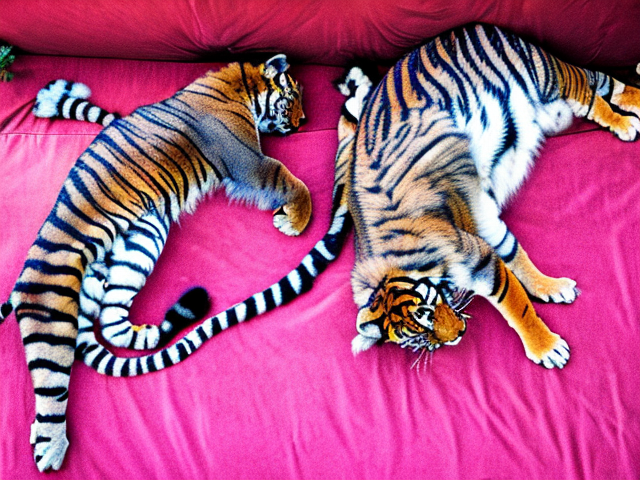
The StableDiffusionDepth2ImgPipeline lets you pass a text prompt and an initial image to condition the generation of new images. In addition, you can also pass a depth_map to preserve the image structure. If no depth_map is provided, the pipeline automatically predicts the depth via an integrated depth-estimation model.
Start by creating an instance of the StableDiffusionDepth2ImgPipeline:
import torch
from diffusers import StableDiffusionDepth2ImgPipeline
from diffusers.utils import load_image, make_image_grid
pipeline = StableDiffusionDepth2ImgPipeline.from_pretrained(
"stabilityai/stable-diffusion-2-depth",
torch_dtype=torch.float16,
use_safetensors=True,
).to("cuda")Now pass your prompt to the pipeline. You can also pass a negative_prompt to prevent certain words from guiding how an image is generated:
url = "http://images.cocodataset.org/val2017/000000039769.jpg"
init_image = load_image(url)
prompt = "two tigers"
negative_prompt = "bad, deformed, ugly, bad anatomy"
image = pipeline(prompt=prompt, image=init_image, negative_prompt=negative_prompt, strength=0.7).images[0]
make_image_grid([init_image, image], rows=1, cols=2)| Input | Output |
|---|---|
![]() | ![]() |